A 32GB memory card holds roughly 1,600 to 10,000 photos depending on the file format, resolution, and camera settings — and understanding how many pictures 32GB hold is one of the most practical things any photographer can figure out before heading into the field. Our team at ClickAndLearnPhotography has tested dozens of card and camera combinations over the years, and the real answer is never as simple as the number printed on the box. Whether planning a behind-the-lens deep dive into a full shoot day or just grabbing a card for a weekend trip, the math matters more than most people think.
The confusion comes from the fact that file sizes vary dramatically. A compressed JPEG from a 12MP smartphone might be 3MB, while a RAW file from a 45MP mirrorless body can easily hit 60MB or more. That single variable — file size — is what separates "thousands of photos" from "a few hundred" on the exact same card. Throughout this guide, we break down the real numbers for every common card size from 16GB to 256GB, bust some persistent myths, and share practical strategies our team relies on to avoid running out of space at the worst possible moment.
Anyone shopping for a new card or wondering whether an existing one is enough will find concrete answers here — no guesswork, just tested data and honest recommendations.
Contents
- Memory Card Myths That Waste Space and Money
- Real-World Photo Counts by Camera and Format
- Smart Ways to Maximize Storage on Any Card
- When to Upgrade Card Size (and When It's Overkill)
- Storage Mistakes That Cost Photographers Shots
- Best Practices for Managing Memory Cards in the Field
- Frequently Asked Questions
- Final Thoughts
Memory Card Myths That Waste Space and Money
There is a surprising amount of bad information floating around about memory card capacity. Our team encounters the same misconceptions regularly, and they lead to poor purchasing decisions and avoidable frustration during shoots.
The "Advertised Capacity" Myth
A 32GB card does not actually provide 32GB of usable storage. Card manufacturers use decimal gigabytes (1GB = 1,000,000,000 bytes), while cameras and computers use binary gigabytes (1GB = 1,073,741,824 bytes). That difference means:
- A "32GB" card delivers roughly 29.8GB of usable space
- A "64GB" card provides about 59.6GB
- A "128GB" card offers approximately 119.2GB
- The file system itself (FAT32, exFAT) also claims a small portion
This is not a scam — it is an industry-wide measurement discrepancy. But it means anyone calculating how many pictures 32GB hold should work with 29.8GB as the real baseline, not 32.
RAW vs JPEG: The File Size Gap Nobody Expects
The second myth is that RAW files are "a little bigger" than JPEGs. In reality, the gap is massive. A 24MP camera produces JPEGs around 8–12MB on average, but RAW files from the same sensor land between 25–35MB. Shooting RAW+JPEG simultaneously — a common recommendation for beginners — nearly doubles the space consumed per shot.
Pro Tip: Anyone shooting RAW+JPEG "just in case" should test whether they ever actually use the JPEGs. In our experience, most photographers who shoot RAW never touch the JPEG copy, and dropping it frees up 30–40% of card space instantly.
Our team has seen photographers show up to full-day events with a single 32GB card, expecting thousands of shots, only to hit the wall at 400 frames because they were shooting uncompressed RAW on a 45MP body. The math is unforgiving.
Real-World Photo Counts by Camera and Format
Rather than relying on manufacturer estimates, our team compiled actual file sizes from popular cameras across multiple formats. These numbers reflect real-world shooting — not lab conditions.
Storage Capacity Breakdown: 16GB to 256GB
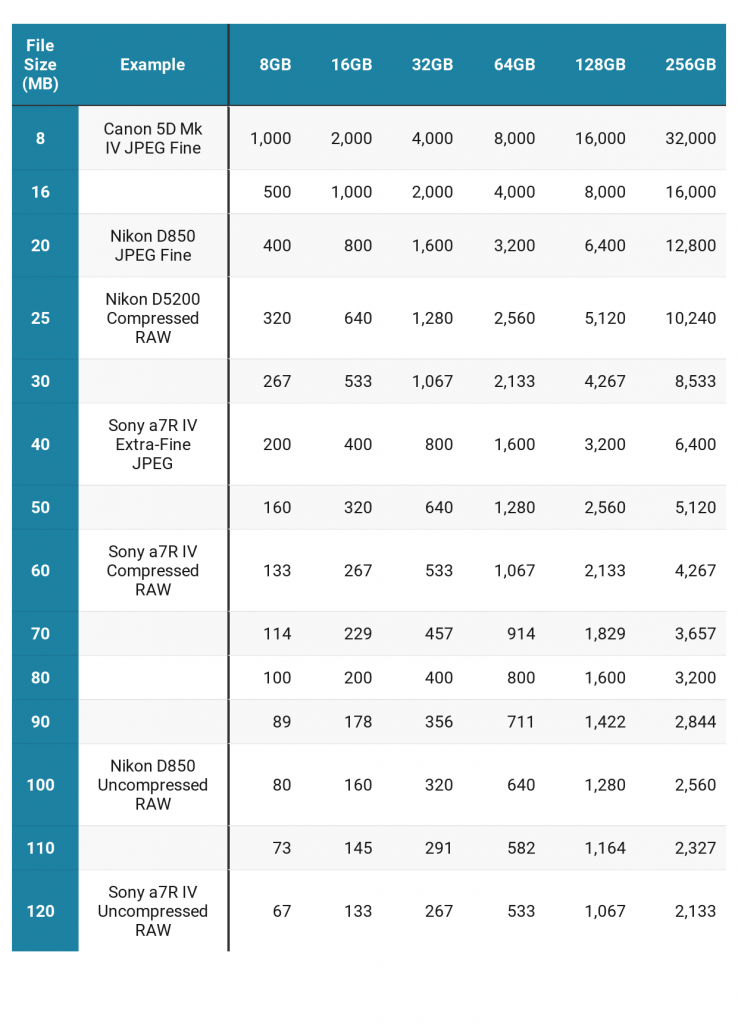
The table below uses average file sizes from common camera categories. JPEG estimates assume high-quality compression (not maximum). RAW estimates vary by sensor and compression type.
| Card Size | Usable Space | 12MP JPEG (~3MB) | 24MP JPEG (~10MB) | 24MP RAW (~30MB) | 45MP RAW (~55MB) |
|---|---|---|---|---|---|
| 16GB | ~14.9GB | ~4,960 | ~1,490 | ~496 | ~270 |
| 32GB | ~29.8GB | ~9,930 | ~2,980 | ~993 | ~541 |
| 64GB | ~59.6GB | ~19,860 | ~5,960 | ~1,986 | ~1,083 |
| 128GB | ~119.2GB | ~39,730 | ~11,920 | ~3,973 | ~2,167 |
| 256GB | ~238.4GB | ~79,460 | ~23,840 | ~7,946 | ~4,334 |
So how many pictures can 32GB hold? For most people shooting 24MP JPEGs, roughly 2,900 to 3,000 photos. Switch to RAW on the same camera, and that drops to under 1,000. On a high-resolution body like the Nikon Z8 or Sony A7R V, 32GB fills up after about 540 RAW frames — barely enough for a single portrait session.
How Megapixel Count Changes Everything
Megapixel count is the single biggest factor in per-image file size. Here is how it scales in practice:
- 12MP (smartphones, older DSLRs): 3–5MB JPEG, 12–18MB RAW
- 20–26MP (most current APS-C and full-frame cameras): 8–12MB JPEG, 25–35MB RAW
- 45–61MP (high-res bodies like the Sony A7R V): 15–20MB JPEG, 50–70MB RAW
- 100MP+ (medium format like the Fujifilm GFX100): 25–30MB JPEG, 100–120MB RAW
Anyone upgrading from a 24MP camera to a 45MP model should expect their card to fill up roughly twice as fast — even with the same settings.
Smart Ways to Maximize Storage on Any Card
Running out of card space mid-shoot is preventable. These are the strategies our team uses to squeeze every usable frame out of any memory card without sacrificing image quality where it counts.
Compression Settings That Save Space
Most cameras offer multiple levels of RAW compression, and the differences are significant:
- Lossless compressed RAW — reduces file size 20–40% with zero quality loss. This is the sweet spot for most photographers and our default recommendation.
- Lossy compressed RAW — saves even more space with minimal quality reduction. Visible artifacts are nearly impossible to detect in normal editing workflows.
- Uncompressed RAW — the largest files with no practical quality advantage over lossless compressed. Most professionals have abandoned this setting entirely.
On a 24MP camera, switching from uncompressed to lossless compressed RAW can take file sizes from 48MB down to 28MB — effectively giving a 32GB card 70% more capacity with no trade-off.
Choosing the Right Format for the Situation
Not every situation demands RAW. Our team switches formats strategically based on the shoot:
- RAW only — paid client work, tricky lighting, anything that needs heavy editing
- JPEG only — casual shooting, events where volume matters more than post-processing latitude, and travel photography where storage and backup time are limited
- RAW+JPEG — situations requiring instant sharing (social media, press) while preserving editing flexibility
Warning: Switching to JPEG to save space only works if the exposure and white balance are nailed in-camera. JPEG files have far less recovery room in post — blown highlights and crushed shadows are permanent.
When to Upgrade Card Size (and When It's Overkill)
Bigger is not always better when it comes to memory cards. Our team has seen both extremes — photographers crippled by cards too small and others hauling 512GB cards they never fill past 20%.
Signs a Bigger Card Is Worth It
Moving to a 64GB or 128GB card makes practical sense when:
- Regularly shooting RAW on a 30MP+ sensor and filling 32GB in a single session
- Covering multi-day events like weddings or fireworks festivals without reliable backup access
- Shooting video alongside stills — even short 4K clips consume storage at alarming rates
- Working in burst mode frequently (sports, wildlife, action photography)
For astrophotography sessions specifically, where long exposures produce large files and shoots can last hours, stepping up to 64GB or 128GB is a sensible investment.
When 32GB Is More Than Enough
A 32GB card remains perfectly adequate for many photographers. It handles the job well in these situations:
- Shooting JPEG on any camera under 26MP
- Short, focused sessions — portraits, product shots, food photography (our food photography guide covers more on keeping sessions efficient)
- Anyone with a disciplined habit of importing and formatting cards after every shoot
- Cameras with dual card slots where the second card serves as overflow
The key question is not "how many pictures can 32GB hold" in the abstract — it is whether that number covers the longest realistic shoot without backup access. If 32GB handles that comfortably, spending more on a larger card is wasted money better put toward glass or lighting.
Storage Mistakes That Cost Photographers Shots
Storage failures rarely happen because of hardware defects. They happen because of bad habits. Our team has collected these lessons the hard way over years of field work.
Not Formatting Cards Properly
This is the most common storage mistake in photography, and it causes more grief than almost any other technical issue:
- Deleting photos on the card is not the same as formatting. Deletion leaves fragmented file tables that slow write speeds and can cause errors over time.
- Cards should always be formatted in the camera that will use them, not on a computer. Camera formatting creates the exact file structure the camera expects.
- Format after every import — not once a month, not when the card is full, but every single time.
A card that has been used for months without formatting accumulates invisible file system debris. Write speeds degrade, and in rare cases, images can be written to corrupted sectors. It takes ten seconds to format. There is no excuse to skip it.
The One-Big-Card Trap
Carrying a single 256GB card feels convenient until that card fails, gets lost, or corrupts. Our team follows a simple philosophy: distribute risk across multiple cards.
Two 64GB cards are safer than one 128GB card. If one fails, half the shoot survives. If a single large card fails, everything is gone. This is especially critical for event and wedding photographers where reshooting is impossible.
Field Rule: Our team never stores an entire event on a single card. Swapping cards every 200–300 shots creates natural backup points — and forces a mental check on remaining capacity.
The counterargument is that modern cards rarely fail, which is true. But "rarely" is not "never," and the cost of carrying a second card is negligible compared to the cost of losing a client's wedding photos.
Best Practices for Managing Memory Cards in the Field
Knowing how many pictures 32GB hold is only useful if the card is managed properly. These are the workflows our team has refined through years of professional and personal shooting.
A Reliable Card Workflow
A consistent card management routine eliminates guesswork and prevents data loss:
- Before the shoot — format the card in-camera and verify the shot counter resets to zero
- During the shoot — monitor remaining capacity on the top LCD or in the EVF. Swap cards before hitting zero, not after the camera locks up mid-burst
- After the shoot — import to at least two locations (primary drive and backup) before formatting
- Storage — keep used cards facing label-down or in a marked slot in a card wallet. Used goes one direction, fresh goes the other. No exceptions
This system is simple enough that it becomes automatic within a week. The photographers who lose images are almost always the ones who "will import later" and then forget which cards are backed up.
Backup Strategies That Actually Work
For anyone shooting in the field without laptop access, portable backup solutions exist at every price point:
- Portable SSDs with card readers — fast, reliable, and under $100 for 1TB. The best option for most people
- Dedicated photo backup devices — products like the Gnarbox or RAVPower FileHub copy cards automatically without a computer
- Dual card slots — many modern cameras write to two cards simultaneously. This is the most seamless backup available, though it halves effective capacity
- Cloud upload via phone — transfer JPEGs via WiFi/Bluetooth to a phone and auto-upload. Slow, but functional for critical selects
The right backup strategy depends on shoot length, location, and stakes. A casual weekend hike with a good camera bag and a couple of 32GB cards needs no elaborate backup plan. A two-week assignment in a remote location absolutely does.
Frequently Asked Questions
How many pictures can 32GB hold for a 24MP camera shooting JPEG?
A 32GB card holds approximately 2,900 to 3,000 high-quality JPEG images from a 24MP camera, assuming an average file size of 10MB per image. Shooting at lower quality settings or lower resolution increases that number, while RAW+JPEG mode reduces it significantly.
Is 32GB enough for a full day of shooting?
It depends on the format and camera. For JPEG shooters with cameras under 26MP, 32GB comfortably covers a full day. For RAW shooters on high-resolution bodies (40MP+), 32GB fills up in 400–600 frames — often not enough for a busy event or all-day outing.
Does the card brand affect how many photos it stores?
No. Storage capacity is determined by the card's size and the camera's file output — not the brand. A 32GB SanDisk and a 32GB Lexar hold the same number of photos. Brand differences affect write speed, durability, and reliability, but not capacity.
Should photographers use several small cards or one large card?
Our team recommends multiple smaller cards over one large card. Spreading shots across two or three cards reduces the risk of total data loss if a card fails or gets lost. The convenience of a single large card is not worth the catastrophic downside of losing an entire shoot.
Final Thoughts
The answer to how many pictures 32GB hold is never a single number — it depends on the camera, format, and compression settings being used. The best next step is to check the average file size of the specific camera and format combination in play, reference the table above, and make sure the card capacity covers the longest realistic shoot with room to spare. Grab a second card as insurance, format before every session, and spend less time worrying about storage and more time making great photographs.
 |
 |
 |
 |

About Alex W.
Alex is a landscape, equine, and pet photographer based in the Lake District, UK, with years of experience shooting in one of Britain's most photographically demanding natural environments. His work has been featured in Take a View Landscape Photographer of the Year, Outdoor Photographer of the Year, and Amateur Photographer Magazine — publications that reflect a serious, competitive standard of image-making. At Click and Learn Photography, he shares the camera settings, gear choices, and compositional techniques he has developed through real-world shooting and competition-level work.
You can Get FREE Gifts. Furthermore, Free Items here. Disable Ad Blocker to receive them all.
Once done, hit anything below
|
|
|
|