The Sony Handycam DCR-TRV33 is our top pick for the best MiniDV camcorder in 2026, thanks to its exceptional 10x optical zoom, touch-panel LCD, and 1-megapixel still image capability that remains unmatched among vintage camcorders. Whether you're looking to digitize a box of old family tapes or shoot new footage with that unmistakable analog warmth, the MiniDV format has experienced a genuine resurgence in recent years.
MiniDV camcorders occupy a unique space in the gear zone — they're not just relics of early-2000s home video. Filmmakers, content creators, and nostalgia enthusiasts are actively seeking these devices for their distinctive visual character. The slightly soft, warm look of MiniDV footage has become a deliberate aesthetic choice, showing up everywhere from indie films to music videos. And for anyone sitting on a shelf full of unlabeled MiniDV tapes, a working camcorder is the only reliable way to recover those memories before the tapes degrade further.
We evaluated the best MiniDV camcorders still available in 2026, focusing on playback reliability, tape-to-digital transfer capabilities, bundle completeness, and overall value. Some of these units are new-old-stock or refurbished, so we paid close attention to what you actually get in the box and how well each option handles the primary job: getting your footage off tape and onto a computer. If you're also exploring modern camera options, our guide to the best cameras under $500 covers today's digital alternatives.

Contents
Our Top Picks for 2026
- #PreviewProductRating
- Bestseller No. 1
 Rating:

- Bestseller No. 2
 Rating:
 - Bestseller No. 3
 Rating:
 - Bestseller No. 4
 Rating:
Product Reviews
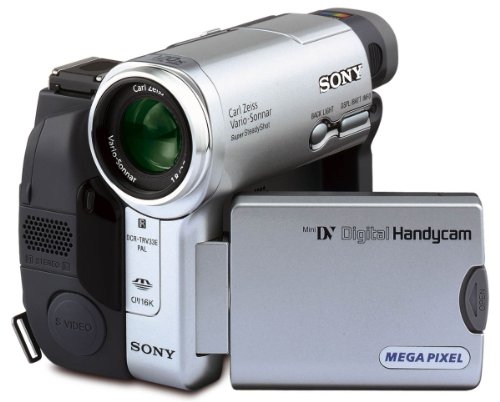
1. Sony Handycam DCR-TRV33 MiniDV Camcorder — Best Overall
The Sony Handycam DCR-TRV33 represents the golden era of MiniDV camcorders, and it still holds up remarkably well in 2026. Built around Sony's proven NTSC stereo recording system, this camcorder delivers 10x optical zoom with Carl Zeiss optics — a combination that produces sharp, well-saturated footage whether you're recording new material or simply using it as a playback device. The 3-inch touch-panel LCD was ahead of its time when this unit launched, and it remains one of the most intuitive interfaces you'll find on any MiniDV camcorder.
What separates the DCR-TRV33 from cheaper alternatives is its 1-megapixel still image capability. You can capture individual frames directly to Memory Stick, which gives you a convenient way to grab screenshots from your tape footage without going through a full digitization workflow. The stereo audio recording is another standout — many budget MiniDV camcorders only captured mono sound, so if you're transferring tapes that were originally recorded on a higher-end unit, you want a player that can handle stereo tracks properly.
Build quality is distinctly Sony from the early 2000s: solid magnesium body, responsive controls, and a tape mechanism that loads and ejects smoothly. The touch-panel adds a layer of convenience for navigating menus and reviewing footage on-device. If you can find one in good working condition, this is the MiniDV camcorder to get. It handles both recording and playback duties with equal competence, and the output quality is the benchmark against which every other option on this list is measured.
Pros:
- 10x optical zoom with Carl Zeiss lens produces excellent image quality
- 3-inch touch-panel LCD makes tape navigation intuitive and fast
- 1-megapixel still capture to Memory Stick for quick frame grabs
- Full stereo audio recording and playback
Cons:
- Finding units in fully working condition is increasingly difficult
- Original batteries are almost certainly dead — budget for a replacement
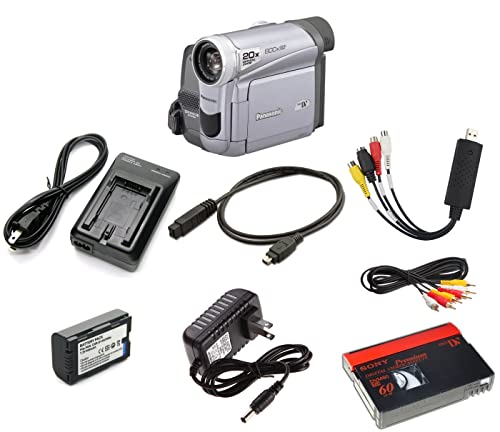
2. Panasonic MiniDV Camcorder Bundle w/USB Adapter — Best for Easy Tape Transfer
If your primary goal is getting old MiniDV tapes digitized without any hassle, the Panasonic MiniDV Camcorder Bundle is the most straightforward path from tape to computer file. This bundle pairs a Panasonic MiniDV camcorder with a USB capture device specifically designed for tape-to-digital transfer, so you don't need to hunt down compatible hardware separately. You plug in, hit play, and the capture device handles the conversion. It's as close to plug-and-play as MiniDV digitization gets in 2026.
The included camcorder handles both playback of existing tapes and recording of new footage. Panasonic's tape transport mechanisms have always been reliable — they tend to be gentler on tapes than some competitors, which matters when you're dealing with older cassettes that may have been stored in less-than-ideal conditions. The bundle also includes a battery and AV cables for direct TV playback, giving you the option to review tapes on a larger screen before committing to the digitization process.
Where this bundle really earns its value is in the completeness of the package. Too many MiniDV camcorders ship as standalone units, leaving you to figure out the transfer chain on your own. Here, everything you need is in the box. The USB capture device works with both Mac and PC, and you can either save files directly to your computer or burn them to DVD. For anyone who wants to archive family memories and store them on an external hard drive, this bundle removes the guesswork entirely.
Pros:
- Complete bundle includes USB capture device for immediate tape transfer
- Works for both playback of old tapes and recording new footage
- Includes battery and AV cables — nothing extra to buy
- Panasonic tape mechanism is gentle on older, fragile tapes
Cons:
- Image quality for new recordings doesn't match the Sony DCR-TRV33
- No optical zoom specification listed — limited for shooting at distance
3. Tech Collector MiniDV Tape Player Camcorder — Best for Vintage Aesthetic
The Tech Collector MiniDV Tape Player Camcorder is purpose-built for creators who want that authentic analog video look without relying on digital filters. This unit shoots directly to MiniDV tape, producing footage with the natural grain, color shifts, and motion characteristics that define the format. If you've seen the trend of vintage-style video on social media and want the real thing rather than a software approximation, this is the camcorder that delivers it.
Beyond the aesthetic appeal, the Tech Collector bundle is thoughtfully assembled. It includes a blank MiniDV tape so you can start shooting immediately, plus AV cables and a USB adapter with tape digitizing software. That last piece is critical — the included software walks you through the process of capturing tape footage to your computer, making it accessible even if you've never worked with analog video before. The VHS-like visual effect you get from MiniDV footage has become a signature look in indie filmmaking, wedding videography highlight reels, and music videos throughout 2025 and into 2026.
The camcorder itself is compact and straightforward to operate. You won't find the advanced features of the Sony DCR-TRV33 here — there's no touch-panel LCD or high-resolution still capture. But that's not the point. This is a tool for a specific creative purpose, and it executes that purpose well. The footage has character that no amount of post-processing can truly replicate. If you're a content creator looking to differentiate your visual style, shooting on actual MiniDV tape gives you an organic texture that audiences immediately recognize as authentic.
Pros:
- Produces genuine analog video aesthetic — no filters needed
- Includes blank tape, USB adapter, and digitizing software
- Compact design is easy to carry for run-and-gun shooting
- Great for creative projects, music videos, and social media content
Cons:
- Limited feature set compared to full-featured MiniDV camcorders
- Not the best choice if your only goal is tape playback and transfer
4. Sony Camcorder for MiniDV Tape Transfer — Best Budget Transfer Kit
The Sony Camcorder for MiniDV Tape Transfer is a no-nonsense bundle built for one primary mission: getting your MiniDV tapes digitized reliably and affordably. The included Sony camcorder is fully capable of playing back all standard MiniDV tapes, and the bundle pairs it with a USB capture device that handles the analog-to-digital conversion. You connect the camcorder to the capture device via the included AV or S-Video cables, plug the USB end into your computer, and start recording. The entire signal chain is accounted for right out of the box.
One detail that sets this bundle apart from the Panasonic option is the inclusion of S-Video cables alongside standard AV cables. S-Video carries a higher-quality signal than composite video by keeping the luminance and chrominance channels separate, which results in noticeably sharper digitized footage. If you're archiving tapes that hold important memories — weddings, birthdays, family gatherings — that quality difference matters. You're only going to digitize these tapes once, so capturing the best possible signal from the start saves you from regret later.
The bundle also includes a power supply, which means you won't drain a battery during long transfer sessions. When you're working through a stack of tapes, being tethered to wall power is actually preferable — you can leave the camcorder running for hours without worrying about a battery dying mid-capture. For pure tape-to-digital workflow efficiency, this Sony transfer bundle delivers everything you need at a price point that undercuts buying each component separately. It's the practical choice for anyone with a box of tapes and a weekend to spare.
Pros:
- Compatible with all standard MiniDV tapes for reliable playback
- Includes both AV and S-Video cables for maximum transfer quality
- Power supply included — ideal for long batch transfer sessions
- USB capture device works with Mac and PC for flexible workflow
Cons:
- Primarily a playback and transfer device — not ideal for new recordings
- Camcorder model may vary, so specific features can differ between units
Key Features to Consider When Choosing a MiniDV Camcorder
Playback Compatibility and Tape Mechanism Quality
The single most important factor when choosing a MiniDV camcorder in 2026 is whether it can reliably play back your existing tapes. Not all MiniDV camcorders handle every tape equally — units with worn or misaligned heads can produce tracking errors, audio dropouts, or distorted playback. Look for camcorders with well-maintained tape transport mechanisms. Sony and Panasonic units generally have the best track record for longevity, though any used camcorder should be tested with a known-good tape before you commit to digitizing your collection.
Pay attention to whether a camcorder supports both SP (Standard Play) and LP (Long Play) modes. Tapes recorded in LP mode pack more footage onto a single cassette but require a player that supports the format. Most higher-end MiniDV camcorders handle both, but some budget units only play SP recordings. If you're not sure which mode your tapes were recorded in, choose a camcorder that explicitly supports both to avoid compatibility issues.
Transfer Capabilities: FireWire vs. USB Capture
The traditional gold standard for MiniDV transfer was IEEE 1394 FireWire, which carries a pure digital signal directly from the tape to your computer. However, FireWire ports have essentially vanished from modern computers, making USB capture devices the practical choice for most people in 2026. USB capture works by converting the camcorder's analog AV output to a digital file — it introduces a generation of analog-to-digital conversion, but the quality loss is minimal with a decent capture device.
If maximum quality is your priority and you have access to a computer with FireWire (or a Thunderbolt-to-FireWire adapter), look for camcorders with DV-out ports. The Sony DCR-TRV33 and similar prosumer models from that era typically include this connection. For everyone else, the USB capture bundles from Panasonic and Sony reviewed above provide the most convenient path. The key is using S-Video output over composite whenever your camcorder and capture device support it — the quality improvement is meaningful.
Recording New Footage vs. Playback Only
Your intended use shapes which camcorder makes sense. If you're buying solely to digitize old tapes, the transfer bundles offer the best value because they include everything you need for the workflow. You don't need a pristine lens or perfect autofocus — you need a reliable tape mechanism, good AV outputs, and a capture device.
If you want to shoot new MiniDV footage for creative projects, your priorities shift toward optical quality, zoom range, and recording features. The Sony DCR-TRV33 stands out here with its Carl Zeiss lens and 10x optical zoom. The Tech Collector option is purpose-built for creators chasing the vintage aesthetic. Understanding what you need the camcorder to do — transfer, record, or both — prevents you from overspending on features you won't use or underspending on capabilities you need. For those comparing video-capable devices more broadly, our guide to different types of cameras covers the full spectrum of options.
Bundle Completeness and Hidden Costs
MiniDV camcorders from the early 2000s require accessories that aren't always included. Batteries are the biggest hidden cost — original battery packs are almost certainly dead after 20+ years, and third-party replacements vary wildly in quality and capacity. Check whether your chosen camcorder includes a power supply for AC operation, which eliminates battery dependency entirely during transfer sessions.
Cables matter more than you might expect. The bundles reviewed above include AV cables and, in some cases, S-Video cables. If you're buying a standalone camcorder without a bundle, budget an additional $15–30 for a USB capture device and appropriate cables. Also verify that any included capture software is compatible with your current operating system — some older bundled software doesn't play well with Windows 11 or recent macOS versions. OBS Studio is a free, reliable alternative for capture if bundled software falls short.
Common Questions
Are MiniDV camcorders still worth buying in 2026?
Yes, for two specific purposes. First, they remain the most reliable way to play back and digitize existing MiniDV tapes before the tapes degrade beyond recovery. Magnetic tape has a finite lifespan, and every year you wait increases the risk of data loss. Second, MiniDV camcorders have found a new audience among creators who want authentic analog video aesthetics. The organic look of MiniDV footage — its grain structure, color rendering, and motion characteristics — cannot be perfectly replicated with digital filters.
What is the best way to transfer MiniDV tapes to a computer?
The most accessible method in 2026 is connecting your MiniDV camcorder to a USB capture device via AV or S-Video cables. The capture device converts the analog signal to a digital file on your computer. For the highest possible quality, use S-Video output instead of composite, and capture at the full DV resolution of 720×480 (NTSC) or 720×576 (PAL). If your camcorder has a FireWire (IEEE 1394) port and your computer supports it via an adapter, FireWire transfer preserves the original digital signal without any analog conversion step.
How long do MiniDV tapes last before they degrade?
Under ideal storage conditions — cool, dry, and away from magnetic fields — MiniDV tapes can last 15 to 25 years. However, most consumer tapes were stored in drawers, closets, and boxes that don't meet archival standards. Humidity, temperature fluctuations, and dust can accelerate degradation significantly. If you have tapes from the early 2000s, they are approaching or already past the point where quality loss becomes noticeable. Digitizing sooner rather than later is strongly recommended.
Can I use a MiniDV camcorder to play back Hi8 or Video8 tapes?
No. MiniDV, Hi8, and Video8 are completely different tape formats with different cassette sizes and recording methods. A MiniDV camcorder can only play MiniDV tapes. Some Sony Digital8 camcorders could play Hi8 and Video8 tapes, but those are a separate product category. If you have mixed tape formats to digitize, you need a compatible player for each format type.
What software should I use to capture MiniDV footage on my computer?
For USB capture devices, OBS Studio (free, open-source) is the most reliable option across Windows, Mac, and Linux. It lets you record the incoming video feed as a file in your preferred format. Some capture devices include their own software, which can be simpler to set up but may lack advanced features. For FireWire capture, iMovie (Mac) and Windows Movie Maker (legacy Windows) natively support DV import. Professional users often prefer Adobe Premiere Pro or DaVinci Resolve for more control over the capture settings and immediate editing access.
Is MiniDV footage better quality than VHS?
Significantly better. MiniDV records at approximately 500 lines of horizontal resolution compared to VHS's roughly 240 lines. MiniDV also uses digital recording on the tape, meaning there's no generational quality loss when copying tapes (though transfer to computer via analog AV cables does introduce one conversion step). The color accuracy, sharpness, and audio quality of MiniDV are all substantially superior to VHS. This quality difference is one reason MiniDV was the standard for prosumer and semi-professional video production throughout the late 1990s and 2000s.
Buy on Walmart
- Sony Handycam DCR-TRV33 MiniDV Camcorder with 10x Optical Zo — Walmart Link
- Panasonic Corp Panasonic miniDV Camcorder Bundle w/USB Adapt — Walmart Link
- Tech Collector miniDV Tape Player Camcorder w/Blank Tape, AV — Walmart Link
- Sony Camcorder for miniDV Tape Transfer to Computer USB and — Walmart Link
Buy on eBay
Key Takeaways
- The Sony Handycam DCR-TRV33 is the best overall MiniDV camcorder for both recording and playback, with its 10x Carl Zeiss zoom and touch-panel LCD setting it apart from the competition.
- For straightforward tape-to-digital transfer, the Panasonic MiniDV Bundle and Sony Transfer Bundle include everything you need in a single box — no hunting for compatible cables or capture devices.
- The Tech Collector MiniDV Camcorder is the go-to choice for creators who want authentic analog footage for music videos, social media, or indie film projects.
- Don't wait to digitize your MiniDV tapes — magnetic tape degrades over time, and tapes from the early 2000s are already at risk of permanent quality loss.
 |
 |
 |
 |

About Alex W.
Alex is a landscape, equine, and pet photographer based in the Lake District, UK, with years of experience shooting in one of Britain's most photographically demanding natural environments. His work has been featured in Take a View Landscape Photographer of the Year, Outdoor Photographer of the Year, and Amateur Photographer Magazine — publications that reflect a serious, competitive standard of image-making. At Click and Learn Photography, he shares the camera settings, gear choices, and compositional techniques he has developed through real-world shooting and competition-level work.
You can Get FREE Gifts. Furthermore, Free Items here. Disable Ad Blocker to receive them all.
Once done, hit anything below
|
|
|
|