Over 70% of professional sports and wildlife photographers rely on back button focus photography as their primary focusing method — yet most hobbyists have never even heard of it. If you've been half-pressing your shutter button to focus and shoot, you're using a system designed in the 1980s that forces two critical functions onto a single button. Back button focus separates focusing from shutter release, giving you faster reaction times, fewer missed shots, and total control over when and where your camera locks on. Whether you're just getting started in our photography beginners section or you've been shooting for years, this technique will transform how you work with autofocus.
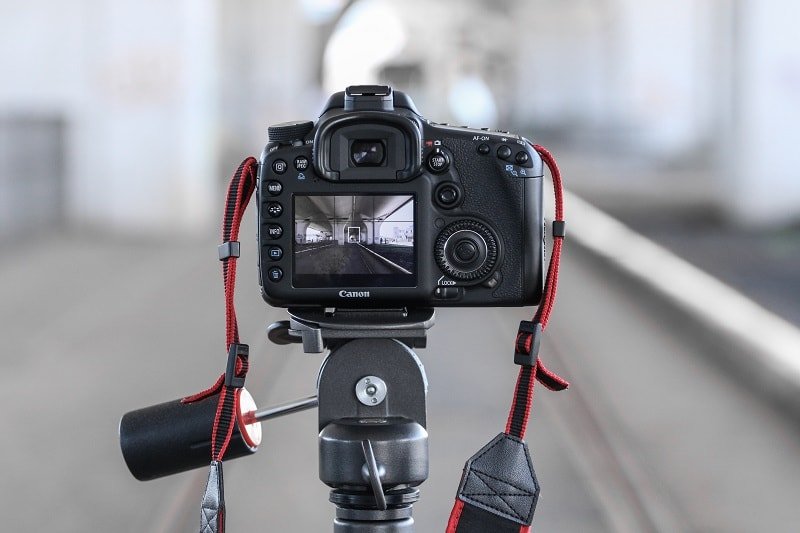
The half-press shutter method bundles autofocus activation and shutter release into one finger motion. That works fine in controlled settings — but the moment your subject moves unpredictably, you start fighting your own camera. Back button focus eliminates that conflict entirely by assigning autofocus to a dedicated button on the rear of your camera body.
In this guide, you'll learn exactly how to set up back button focus on any camera system, when it gives you a clear advantage, and how to troubleshoot the most common issues photographers face during the transition. By the end, you'll understand why so many pros consider this the single most impactful camera setting change you can make.
Contents
- Why the Shutter Button Was Never Meant to Do Everything
- How to Set Up Back Button Focus on Any Camera
- Five Shooting Scenarios Where Back Button Focus Wins Immediately
- Half-Press Shutter vs. Back Button Focus — A Direct Comparison
- Fixing Common Back Button Focus Problems
- Building Back Button Focus Into Your Long-Term Workflow
- Frequently Asked Questions
- Next Steps
Why the Shutter Button Was Never Meant to Do Everything
When autofocus first appeared on consumer cameras in the mid-1980s, manufacturers needed a simple way to trigger it. The shutter button was the obvious choice — photographers were already pressing it to take photos. Half-press to focus, full-press to fire. It was intuitive, and it worked well enough for the technology of the time.
But camera autofocus systems have evolved dramatically since then. Modern cameras offer dozens of focus points, eye-tracking AF, subject recognition, and multiple focus modes. Cramming all of that activation onto the same button you use to capture the image creates real limitations:
- You can't lock focus and recompose without switching to manual focus or using a focus-lock button
- Every time you press the shutter, the camera re-focuses — even when you've already nailed the focus
- Switching between single-shot AF (AF-S) and continuous AF (AF-C) requires diving into menus mid-shoot
- In burst mode, the camera hunts for focus between frames when you don't want it to
- You lose the ability to pre-focus on a spot and wait for your subject to arrive
Back button focus photography solves every one of these problems by moving the autofocus trigger to a button you press with your right thumb. Your shutter button becomes a pure capture trigger. Two functions, two buttons, zero conflict.
This isn't a hack or a workaround. Canon introduced the AF-ON button specifically for this purpose in the early 1990s, and every major manufacturer now includes a dedicated back focus button. The feature exists because camera engineers recognized the fundamental limitation of the half-press system.
How to Set Up Back Button Focus on Any Camera
The setup process takes under two minutes on any modern camera. The core steps are the same regardless of brand: disable autofocus on the shutter button, then assign autofocus to a rear button.
Canon Setup
- Navigate to Custom Functions (orange wrench icon) in your menu
- Find "Shutter/AE Lock button" or "Customize buttons"
- Set the shutter button to "Metering start" only (removes AF activation)
- Confirm that the AF-ON button activates autofocus (this is usually the default)
- On entry-level Canon bodies without a dedicated AF-ON button, assign AF to the * (AE Lock) button instead
Nikon Setup
- Go to Custom Settings Menu → Autofocus → AF Activation
- Set "AF activation" to AF-ON only
- Alternatively, go to Controls → Assign "Shutter button" → set to "AE Lock only"
- The AF-ON button on the rear already triggers autofocus by default
Sony and Mirrorless Setup
- Navigate to Camera Settings → AF → "AF w/ shutter"
- Set "AF w/ shutter" to Off
- Go to Custom Key settings and confirm the AF-ON button (or AEL button) is set to "AF On"
- On Sony bodies, you can also assign AF to the C1 or C2 custom buttons if you prefer a different thumb position
Pro Tip: After setting up back button focus, shoot 200–300 test frames before taking it on a real assignment. Your thumb needs to build its own muscle memory, and you don't want to be learning during a shoot that matters.

Five Shooting Scenarios Where Back Button Focus Wins Immediately
You don't need months of practice to see results. These five scenarios show immediate improvement the moment you switch to back button focus photography.
- Focus and recompose portraits. Press the back button to lock focus on your subject's eye, then recompose the frame without the camera refocusing. With the half-press method, shifting the camera after locking focus often triggers a re-focus on the background.
- Waiting for wildlife or street subjects. Pre-focus on a specific spot — a perch, a doorway, a crosswalk — then take your thumb off the AF button. When your subject arrives, fire immediately. No focus delay whatsoever. This technique is invaluable for the kind of anticipatory shooting covered in street photography tips.
- Switching between still and moving subjects. Hold the AF-ON button continuously and your camera tracks in continuous AF mode. Tap it once and release, and you've locked single-point focus. No menu changes required. One button, both modes.
- Burst shooting with locked focus. When you're firing rapid frames of a stationary subject, the shutter button won't re-trigger autofocus between shots. Every frame stays tack sharp on your original focus point.
- Landscape photography on a tripod. Focus once with your back button, release it, and your focus stays locked for as many exposures as you need — bracketed sets, long exposures, time-lapses. This pairs perfectly with the techniques in our landscape shooting guide.
Each of these scenarios would require either a menu change or an extra step with the traditional half-press method. Back button focus handles all of them with no workflow changes.
Half-Press Shutter vs. Back Button Focus — A Direct Comparison
Here's how the two methods stack up across the situations you encounter most often in the field.
| Scenario | Half-Press Shutter | Back Button Focus |
|---|---|---|
| Focus and recompose | Must hold half-press while recomposing — risk of accidental re-focus | Tap AF-ON, release, recompose freely |
| Switch AF-S to AF-C | Requires menu or switch change | Hold button = continuous; tap = single |
| Pre-focusing on a spot | Switch to manual focus or hold half-press | Focus once, release button, wait and fire |
| Burst mode (static subject) | Camera may re-focus between frames | Focus stays locked — no re-hunting |
| Tripod shooting / bracketing | Risk of re-focus on each shutter press | Focus locked until you press AF-ON again |
| Action / sports tracking | Works, but release to stop = shutter fires | Release AF-ON to stop tracking; shutter independent |
| Learning curve | Intuitive for beginners | 1–2 week adjustment period |
Single Focus vs. Continuous Focus Flexibility
This is the biggest practical advantage. With back button focus, your camera's AF mode setting becomes less important because your thumb controls the behavior in real time:
- Set your camera to AF-C (continuous) as the default mode
- For a static subject, tap AF-ON once and release — your camera locks focus as if it were in AF-S
- For a moving subject, hold AF-ON — continuous tracking engages
- You never touch the focus mode switch again
This effectively gives you both focus modes on a single button. That alone is worth the switch.
The Focus-and-Recompose Advantage
Placing your subject dead center in every frame makes for boring composition. You know this. But the half-press method punishes you for recomposing — any slight finger movement can break the focus lock or accidentally fire the shutter.
With back button focus, you separate the act of focusing from the act of shooting entirely. Focus on your subject, take your thumb off AF-ON, and move the camera to compose your shot. The focus point stays exactly where you set it. Press the shutter whenever you're ready. This is especially powerful for portrait and environmental photography where you want your subject placed at a rule-of-thirds intersection rather than dead center.

Fixing Common Back Button Focus Problems
The transition to back button focus comes with predictable stumbling blocks. Here's what to expect and how to push through each one.
Breaking Shutter-Press Muscle Memory
This is the number one reason photographers abandon back button focus too early. After years of half-pressing to focus, your index finger does it automatically. You'll forget to press the back button and fire unfocused shots. This is completely normal.
- Commit to a full two weeks of exclusive back button focus use — no switching back
- Practice at home first: focus on objects around the room, recompose, fire
- Put a small piece of tape next to the AF-ON button as a tactile reminder during the first few days
- Review your shots after each session — you'll see the out-of-focus rate drop dramatically by day 5
Warning: Do not switch back to half-press shutter focus "just for this one shoot." Every time you revert, you reset the muscle memory clock. Commit fully or you'll never build the habit.
Low-Light Focusing Challenges
Some photographers report that back button focus feels slower in low light. The reality is that the AF speed is identical — the camera uses the same focusing system regardless of which button triggers it. What changes is your workflow awareness.
- In dark conditions, press and hold AF-ON to give the camera time to acquire focus before firing
- Use the AF-assist beam if your camera has one (check that it's enabled in menus)
- Switch to a single, center AF point in very dark environments — center points are typically cross-type and more sensitive
- For extremely dark scenes (astrophotography, for example), switch to manual focus via the lens switch. Back button focus doesn't interfere with manual focus at all.
Other common issues and quick fixes:
- Camera won't focus at all after setup: You likely disabled AF on both the shutter and the back button. Double-check that AF-ON is assigned to autofocus activation in your custom controls menu.
- AF-ON button feels hard to reach: Try assigning focus to the AE-L/AF-L button instead, which sits closer to the thumb rest on many camera bodies.
- Accidentally pressing AF-ON during video: Many cameras let you assign different button functions for stills and video modes. Disable AF-ON in video if it's causing issues.
- Back button focus not working in Live View: Some older DSLRs use a different AF system in Live View. Check your model's specific Live View AF settings.
Building Back Button Focus Into Your Long-Term Workflow
Once you've cleared the initial adjustment period, back button focus becomes the foundation for a more efficient overall shooting workflow. Here's how to build on it across different photography genres.
Adapting BBF Across Photography Genres
Landscape photography: Set your camera to AF-S mode with back button focus. Focus on your foreground element or hyperfocal distance, release the button, and shoot freely. When you're doing exposure brackets or long exposures, your focus stays locked without needing to switch to manual. If you're working with neutral density filters during sunrise sessions, this eliminates the common problem of accidentally refocusing through a dark filter.
Sports and action: Keep your camera in AF-C mode. Hold AF-ON to track the athlete through the frame. When the action pauses — between plays, during a setup — simply lift your thumb. The camera stops tracking but stays ready. Press again instantly when action resumes. No mode switching, no menu diving.
Portrait sessions: This is where back button focus truly shines for everyday work. Focus on the eye, release, and recompose freely for every variation — horizontal, vertical, tight crop, wide environmental. Your focus stays locked until you tell it otherwise.
Street photography: Pre-focus on a zone or specific distance. Walk with your thumb off the AF button. When something happens, fire immediately. Zero shutter lag from autofocus hunting. You capture the moment, not the moment after.
Macro photography: At extreme magnifications, even the slightest focus shift ruins the shot. Lock focus with BBF, then use body movement to fine-tune the focus plane. The camera won't interfere.
Custom Button Mapping Strategies
Most modern cameras let you customize multiple rear buttons. Once you're comfortable with back button focus, consider expanding your button assignments:
- AF-ON: Primary autofocus activation (continuous tracking)
- AE-L button: Assign to "AF-ON + Single Point" for precision single-shot focus
- Joystick press (if available): Assign to "Eye AF" for instant eye detection
- Function button (Fn1/Fn2): Assign to AF area mode toggle — switch between wide area and single point without menus
This gives you a complete autofocus control system operated entirely by your right thumb and nearby fingers — no menus, no mode dials, no hesitation. You react to the scene in real time.
Frequently Asked Questions
Does back button focus work on every camera?
Every DSLR and mirrorless camera from Canon, Nikon, Sony, Fujifilm, Panasonic, and Olympus/OM System supports back button focus. The exact menu location varies, but the function is universal. Even some advanced compact cameras offer it through custom button assignment.
Will back button focus make my autofocus faster?
It does not change the speed of your camera's AF motor or detection system. What it does is eliminate the delay caused by accidental re-focusing. Your effective focus speed — the time from decision to locked focus — improves because you remove unnecessary AF cycles.
Can I still use half-press shutter focus for some situations?
Technically yes — you can reassign the shutter button at any time. However, switching back and forth between methods creates confusion and prevents you from building reliable muscle memory. Most photographers who fully commit to back button focus never go back.
What if my camera doesn't have a dedicated AF-ON button?
Entry-level camera bodies often lack a labeled AF-ON button, but they always have an AE-L (auto exposure lock) or similar rear button. You can reassign this button to activate autofocus. Check your camera's custom controls or custom functions menu.
Does back button focus drain battery faster?
No. The autofocus system draws the same power regardless of which button activates it. In practice, you may use slightly less battery because you eliminate unnecessary re-focusing cycles that occur with the half-press method.
How long does it take to get comfortable with back button focus?
Most photographers report that the transition takes between one and two weeks of regular shooting. The first three days feel awkward. By day five, you'll start reaching for the back button instinctively. By two weeks, the old method feels wrong.
Is back button focus useful for video?
It can be, but video autofocus workflows differ significantly. Many videographers prefer tap-to-focus on the touchscreen or manual focus with follow-focus rigs. If you shoot hybrid stills and video, you can assign different button functions for each mode on most modern cameras.
Do professional photographers actually use back button focus?
Yes. It is the standard focusing method among professional sports, wildlife, wedding, and photojournalism photographers. Survey data from professional photography forums consistently shows that back button focus is the preferred method among working pros by a wide margin.
Next Steps
- Set up back button focus on your camera right now. Follow the brand-specific steps above — it takes less than two minutes. Don't wait for your next shoot; do it today so you can start practicing immediately around your home.
- Shoot 300 practice frames over the next three days. Focus on everyday objects, pets, people walking by. Alternate between tapping AF-ON (single focus lock) and holding it (continuous tracking). Review your shots each evening and note how the out-of-focus rate drops.
- Take back button focus on a real shoot by the end of next week. Choose a low-pressure outing — a walk through the park, a casual portrait session, or a landscape trip. Resist the urge to switch back to half-press shutter focus, even if you miss a few shots early on.
- Customize a second rear button for a complementary AF function. Once you're comfortable with AF-ON, assign your AE-L or function button to eye-detect AF or a different AF area mode. Build out your thumb-driven focus control system one button at a time.
 |
 |
 |
 |

About Alex W.
Alex is a landscape, equine, and pet photographer based in the Lake District, UK, with years of experience shooting in one of Britain's most photographically demanding natural environments. His work has been featured in Take a View Landscape Photographer of the Year, Outdoor Photographer of the Year, and Amateur Photographer Magazine — publications that reflect a serious, competitive standard of image-making. At Click and Learn Photography, he shares the camera settings, gear choices, and compositional techniques he has developed through real-world shooting and competition-level work.
You can Get FREE Gifts. Furthermore, Free Items here. Disable Ad Blocker to receive them all.
Once done, hit anything below
|
|
|
|